
Clip Studio vs Comic Draw
Comparative Review: Clip Studio Paint vs. Comic Draw by Plasq
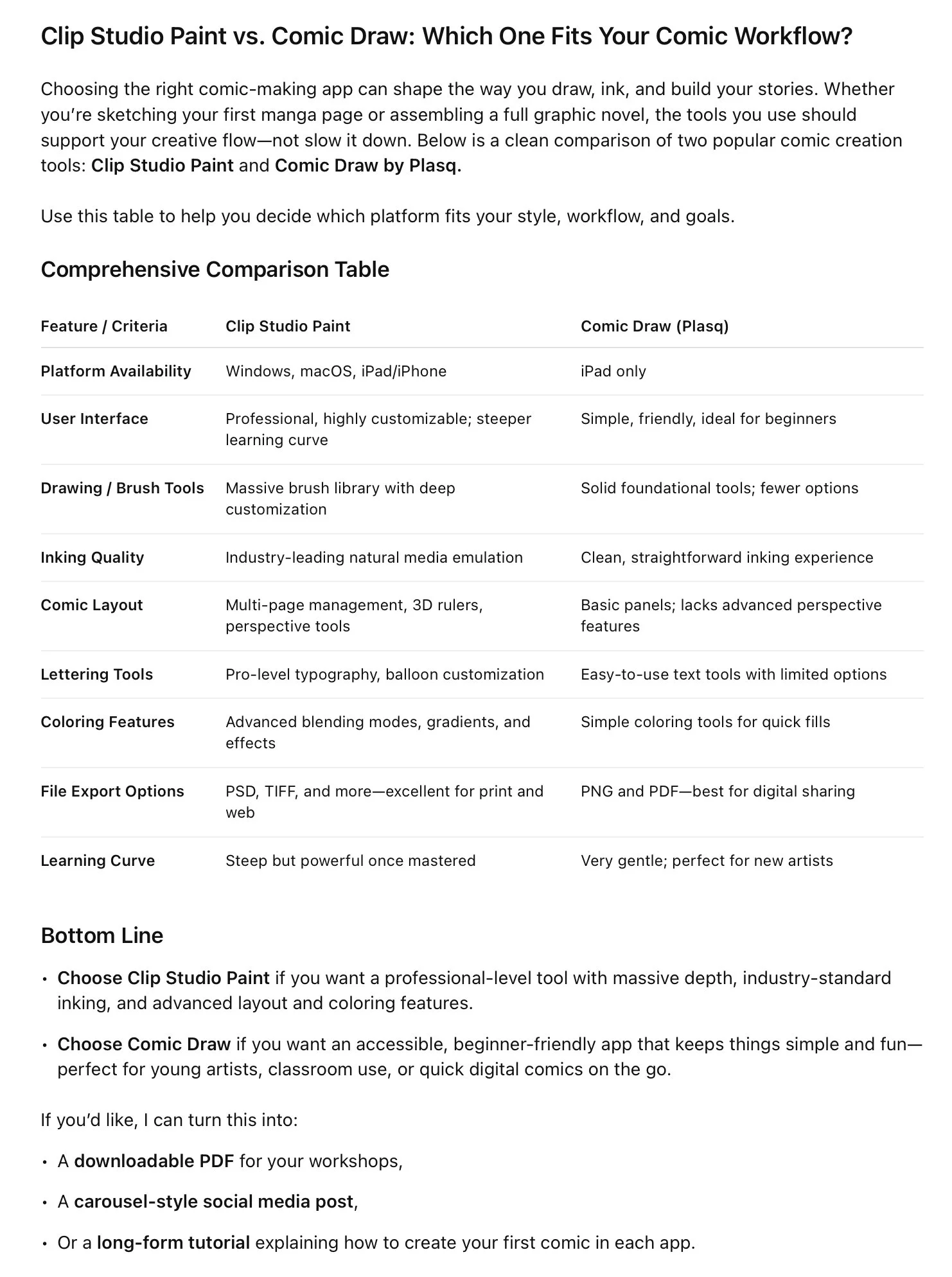
When it comes to digital tools for comic creation and illustration, Clip Studio Paint and Comic Draw by Plasq stand out as two prominent options. Both cater to artists, illustrators, and comic creators but differ significantly in features, ease of use, and platform focus. This review provides a detailed comparison of these two applications based on key criteria, followed by a comprehensive pros and cons table.

Overview
Clip Studio Paint is widely regarded as a professional-grade digital art application, popular among manga artists, illustrators, and comic creators. It offers a robust suite of tools tailored for detailed art production, supporting everything from sketching to final touches, color management, and multi-page comic layout.
Comic Draw by Plasq is an iPad-exclusive app specifically designed for comic artists, integrating sketching, inking, coloring, and lettering within a streamlined interface. It emphasizes ease of use and accessibility, making it a practical choice for iPad users seeking an all-in-one comic creation tool.
Feature Comparison
1. Platform and Accessibility
Clip Studio Paint is available on Windows, macOS, and iPad/iPhone, making it versatile across desktop and mobile environments.
Comic Draw is only available for iPad, limiting it to Apple users but optimizing touch and Apple Pencil integration.
2. User Interface and Learning Curve
Clip Studio Paint provides a highly customizable workspace but has a steeper learning curve due to its depth and breadth of tools.
Comic Draw offers a simplified, intuitive interface designed for quick access to essential comic tools, ideal for beginners or those wanting a straightforward workflow.
3. Drawing and Inking Tools
Clip Studio Paint supports highly advanced brush dynamics with extensive brush libraries, customizable pens, and natural media emulation.
Comic Draw includes a solid selection of brushes suitable for sketching and inking but is less comprehensive compared to Clip Studio’s offerings.
4. Comic Layout and Panels
Clip Studio Paint excels with sophisticated tools for panel creation, perspective rulers, 3D models, and page management for multi-page projects.
Comic Draw facilitates panel creation and resizing with templates and easy rearrangement but lacks advanced grid and 3D perspective tools.
5. Lettering and Speech Balloons
Clip Studio Paint boasts powerful text tools with customizable fonts, balloon creation, and connective lines, allowing precise control over dialogue presentation.
Comic Draw integrates lettering and balloons designed for ease of use, with several styles prebuilt, though it offers less fine-tuning capability.
6. Color Tools and Effects
Clip Studio Paint has robust coloring features, including advanced blending modes, gradient maps, and layer effects.
Comic Draw provides basic coloring functionality with straightforward paintbrushes and fill tools, aimed at simpler coloring tasks.
7. File Management and Export Options
Clip Studio Paint supports multiple file formats (PSD, TIFF, BMP, etc.) and export options suitable for printing and web publishing.
Comic Draw exports to popular formats like PNG and PDF, optimized for digital sharing but with fewer advanced export settings.
8. Pricing Model
Clip Studio Paint generally employs a one-time purchase or subscription model with standard and EX versions reflecting tool complexity.
Comic Draw is a one-time purchase app with no subscription, appealing for budget-conscious users focused on iPad drawing.